
How to Make Studio Ghibli AI Art: A Guide to Magical Results
Today’s Studio Ghibli-style AI art generators make it easier than ever to create artwork inspired by Ghibli’s soft, whimsical, and nostalgic aesthetic. By early 2025, according to Reuters, this style became a global trend, helping accelerate AI adoption and pushing ChatGPT past 150 million weekly active users. But the question now is how to make Studio Ghibli AI art.
This article walks you through five simple steps to achieve enchanting results. It also includes 10 ready-to-use prompts that you can copy and apply.
Key takeaway:
- Clearly defining your concept, character, and scene can help the AI generate accurate and appealing Ghibli-style visuals.
- Use pastel colors, earth tones, soft sunlight, and magical ambient light to capture Ghibli’s signature soft and whimsical look.
- Specify resolution, aspect ratio, and format in your prompts to create posters or wallpapers with minimal adjustments.
5 Easy Steps to Make Studio Ghibli AI Art
How to get the Ghibli aesthetic in AI image tools? You simply need a clear idea and the right prompts to capture its soft, magical feel. Here are easy steps to make it.
1. Start With a Clear Idea and Character Description
Clarity is key when creating AI prompts. So, start with a clear idea and describe your character with simple details like age, personality, outfit, and pose. For example, instead of “beautiful girl,” use “A curious 12-year-old girl wearing a yellow dress and a small satchel, looking excited.”
2. Choose the Right Setting and Mood
How to make Studio Ghibli AI art involves more than generating images. It requires selecting the right mood and setting, so choosing the right mood helps shape the overall tone of your image.
Your background is equally important. Consider including details, such as the setting, season, or cultural elements. For example, “A serene spring morning in a small Japanese village, where cherry blossom petals glide softly through the air.”
3. Define Color Palette and Lighting
Whatever Studio Ghibli AI art generator you use, defining the right color palette and lighting is key. Using pastel colors and earth tones in your prompts helps create a soft and inviting palette.

Adding lighting such as soft sunlight, golden hour glow, or magical ambient light also gives your artwork a whimsical and lively feel. Together, these elements make the scene vibrant, cinematic, and true to Ghibli’s signature aesthetic.
4. Build Your Prompt with the Right Keywords
Keywords help the AI understand the essential elements you want to highlight. The clearer and more specific your keywords are, the more likely the final result will match the story-rich Ghibli aesthetic.
For example, instead of using vague terms like “nice scenery,” use more detailed keywords, including “soft lighting” or “whimsical environment.”
5. Adjust the Output for Posters or Wallpapers
Adjusting your output for a poster or wallpaper means setting the right size, composition, and resolution from the start. Posters usually use vertical ratios like 3:4 or 2:3, while wallpapers work best with horizontal ratios like 16:9.
Specifying formats such as “high-resolution vertical poster” or “wide 16:9 wallpaper” in your prompt helps the AI produce a well-composed image.
Also Read: AI Video Generators: The Future of Efficient Video Marketing with ImagineArt
10 Example Studio Ghibli AI Prompts
The best AI generators for creating Studio Ghibli-style images, like ChatGPT-4o Studio Ghibli AI and Fotor’s Ghibli AI Generator, still need the right prompts. Here are 10 ready-to-use prompts you can try in these tools.
1. Adventurous Girl on a Hill

Prompt: “Rendered in high-resolution 16:9 widescreen, a fanciful Studio Ghibli–inspired scene depicts a curious young girl with short hair standing on a wildflower and grass-covered hill, feeling a gentle breeze under warm sunlight, with soft, dreamy light illuminating fluffy clouds and subtle sparkles, creating an enchanting atmosphere.”
2. Elderly Wizard in a Magical Valley
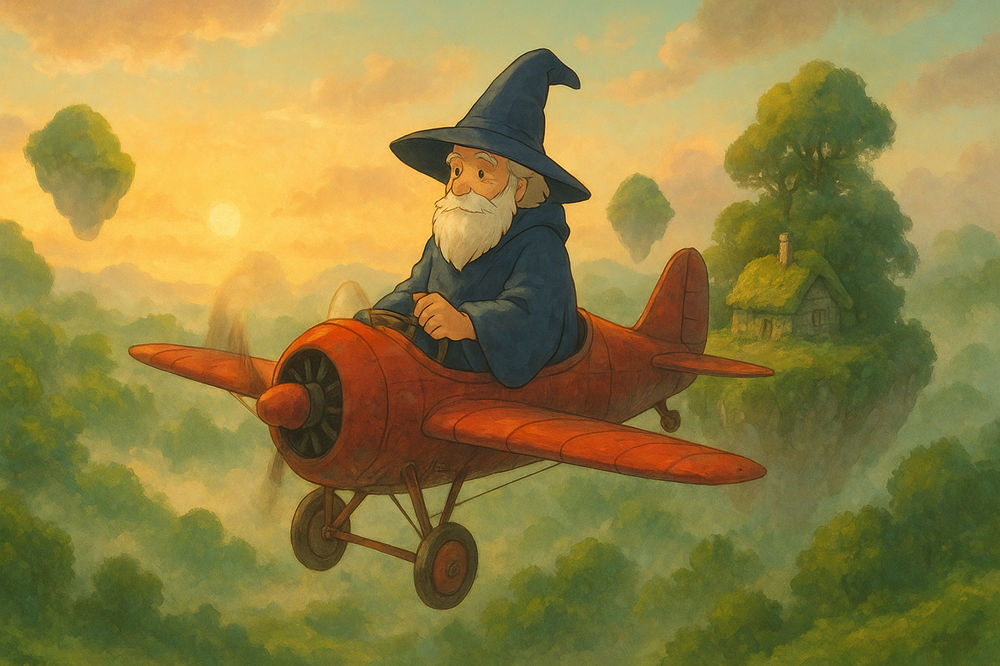
Prompt: “Studio Ghibli style in 21:9 ultra-wide format, an elderly wizard flying a retro plane over a foggy valley dotted with floating islands and moss-covered cottages, warm whimsical mood, soft golden sunrise lighting illuminates, drifting clouds, subtle magic, surrounded by lush greenery.”
3. Seaside Town

Prompt: “A coastal village in Studio Ghibli style, rendered in high-resolution 16:9 wallpaper format, showcasing a cerulean sea with languid, undulating waves, seagulls soaring gracefully overhead, and golden summer sunlight shimmering across the water, colorful hillside houses, surrounded by lush coastal greenery, soft breezy atmosphere, and a dreamy nostalgic summer vibe.”
Also Read: 10 Best Free Image to Video AI to Bring Your Photos to Life
4. Young Witch in a Magical Sky
Prompt: “A young witch flying on a broom across a wide pastel sky in Studio Ghibli style in high-resolution 21:9 ultra-wide format, surrounded by soft drifting clouds, gentle wind, warm light on her silhouette, and a whimsical magical mood, clean spacious composition.”
5. Enchanted Forest
Prompt: “Studio Ghibli style, a magical forest designed in a horizontal 16:9 wallpaper format with a cinematic, centered composition, tall mossy trees rise above a misty forest floor, soft warm light filters through the canopy, fireflies glow gently, and ferns and wildflowers abound, creating a serene and enchanted atmosphere.”
6. Forest Spirit by the Quiet River
Prompt: “In a Studio Ghibli–inspired vision, a forest spirit takes the form of a young woman with short black hair, poised beside a placid river within a vertical 2:3 poster frame. She is embraced by towering moss-draped trees and a whispering mist, while subtle ripples trace the water’s surface. Painted in tender pastel tones, the tableau radiates a serene, enchanted ambiance, perfectly balanced in composition.”
7. Nostalgic Old Train Station
Prompt: “An old train station entwined with vines in a Ghibli-inspired style designed as a high-resolution vertical poster in 2:3 format, bathed in a warm, nostalgic sunset. Soft golden lighting highlights earthy pastel tones, with a cinematic, balanced composition of the station front.”
8. Whimsical Cat in a Magical Village
Prompt: “In Studio Ghibli-style, a diminutive orange cat bearing a petite satchel meanders through a bewitching town, rendered in high-resolution vertical 3:5 poster format. Muted pastel tones and tender, ethereal lighting accentuate delicate painterly textures, evoking a whimsical, heartwarming aura.”
9. Rainy Ghibli Street Scene
Prompt: “Rainy Ghibli-style street, high-resolution 16:9 widescreen format, soft reflections on wet pavement, colorful umbrellas, calm emotional mood, cool desaturated colors, soft diffused lighting, cinematic street-level framing.”
10. Cozy Mechanical Workshop
Prompt: “Cozy mechanical workshop with wooden tables filled with tools, in a whimsical Studio Ghibli-inspired style with high-resolution vertical 3:4 portrait format, floating dust particles glowing in warm morning light, peaceful nostalgic mood, soft warm color palette, detailed interior framing with gentle shadows.”
Also Read: Best AI Image Generator for Line Art You Need to Try
Human Creativity Still Matters in Creating Ghibli AI Art
How to make Studio Ghibli AI art is easier with AI, but human creativity is what makes each piece truly original. AI can imitate soft lighting, watercolor textures, and whimsical details, but it cannot understand the emotion or intention behind the art. Only humans can add personal stories, experiences, and artistic choices that give the work its soul.
Also Read: 20 Funny Prompts for AI Art Generator, Let’s Get Silly!
Enhance Your Ghibli-Inspired Art with StringLabs Creative Fonts
How to make Studio Ghibli AI art is now easier than ever. By defining a clear concept, choosing the right mood, using detailed keywords, and refining the colors, lighting, and output format in the prompt, you can create visuals that reflect Ghibli’s soft, whimsical, story-driven aesthetic.
To enhance your final results, it is highly recommended to use premium fonts from StringLabs Creative. Our elegant and artistic collections help you to create designs that look professional, aesthetic, and consistent with your brand. In addition, many of our fonts also support multilingual characters for global design needs. For orders, visit the StringLabs Creative website!